

Anunciando tauri-egui 0.1.0
El equipo de Tauri se complace en anunciar la primera versión de tauri-egui.
egui es una biblioteca de GUI escrita en Rust. Aprovecha un contexto de OpenGL a través de glutin.
tauri-egui es un plugin de Tauri que se conecta con el bucle de eventos del runtime de Tauri para permitirte crear ventanas glutin a través de nuestro fork de glutin y usar egui a través de nuestra integración egui-tao.
Configuración
Sección titulada “Configuración”El primer paso es añadir el crate a tus dependencias en Cargo.toml:
[dependencies]tauri-egui = "0.1"Ahora necesitas habilitar el plugin:
fn main() { tauri::Builder::default() .setup(|app| { app.wry_plugin(tauri_egui::EguiPluginBuilder::new(app.handle())); Ok(()) })}Crear un diseño con egui
Sección titulada “Crear un diseño con egui”Para usar egui, todo lo que necesitas hacer es implementar el trait tauri_egui::eframe::App para renderizar elementos utilizando la API de egui. En el siguiente ejemplo, crearemos un diseño de inicio de sesión.
- Define la estructura que se usará para renderizar el diseño:
use std::sync::mpsc::{channel, Receiver, Sender};use tauri_egui::{eframe, egui};
pub struct LoginLayout {  heading: String,  users: Vec<String>,  user: String,  password: String,  password_checker: Box<dyn Fn(&str) -> bool + Send + 'static>,  tx: Sender<String>,  texture: Option<egui::TextureHandle>,}
impl LoginLayout { pub fn new( password_checker: Box<dyn Fn(&str) -> bool + Send + 'static>, users: Vec<String>, ) -> (Self, Receiver<String>) { let (tx, rx) = channel(); let initial_user = users.iter().next().cloned().unwrap_or_else(String::new); ( Self { heading: "Sign in".into(), users, user: initial_user, password: "".into(), password_checker, tx, texture: None, }, rx, ) }}- Implementa
tauri_egui::eframe::Apppara usar las API de egui:
impl eframe::App for LoginLayout {  // Called each time the UI needs repainting  // see https://docs.rs/eframe/latest/eframe/trait.App.html#tymethod.update for more details  fn update(&mut self, ctx: &egui::Context, frame: &mut eframe::Frame) {    let Self {      heading,      users,      user,      password,      password_checker,      tx,      ..    } = self;
    let size = egui::Vec2 { x: 320., y: 240. };    // set the window size    frame.set_window_size(size);
// adds a panel that covers the remainder of the screen egui::CentralPanel::default().show(ctx, |ui| { // our layout will be top-down and centered ui.with_layout(egui::Layout::top_down(egui::Align::Center), |ui| { // we will start adding elements here in the next sections }); }); }}- Define algunas funciones auxiliares que usaremos:
fn logo_and_heading(ui: &mut egui::Ui, logo: egui::Image, heading: &str) {  let original_item_spacing_y = ui.style().spacing.item_spacing.y;  ui.style_mut().spacing.item_spacing.y = 8.;  ui.add(logo);  ui.style_mut().spacing.item_spacing.y = 16.;  ui.heading(egui::RichText::new(heading));  ui.style_mut().spacing.item_spacing.y = original_item_spacing_y;}
fn control_label(ui: &mut egui::Ui, label: &str) { let original_item_spacing_y = ui.style().spacing.item_spacing.y; ui.style_mut().spacing.item_spacing.y = 8.; ui.label(label); ui.style_mut().spacing.item_spacing.y = original_item_spacing_y;}- Carga una imagen, asígnala como una textura y añádela a la UI (requiere la dependencia de
png):
let texture: &egui::TextureHandle = self.texture.get_or_insert_with(|| { let mut reader = png::Decoder::new(std::io::Cursor::new(include_bytes!("icons/32x32.png"))) .read_info() .unwrap(); let mut buffer = Vec::new(); while let Ok(Some(row)) = reader.next_row() { buffer.extend(row.data()); } let icon_size = [reader.info().width as usize, reader.info().height as usize]; // Load the texture only once. ctx.load_texture( "icon", egui::ColorImage::from_rgba_unmultiplied(icon_size, &buffer), egui::TextureFilter::Linear, )});logo_and_heading( ui, egui::Image::new(texture, texture.size_vec2()), heading.as_str(),);- Añade el ComboBox de selección de usuario:
ui.with_layout(egui::Layout::top_down(egui::Align::Min), |ui| { control_label(ui, "User"); egui::ComboBox::from_id_source("user") .width(ui.available_width() - 8.) .selected_text(egui::RichText::new(user.clone()).family(egui::FontFamily::Monospace)) .show_ui(ui, move |ui| { for user_name in users { ui.selectable_value(user, user_name.clone(), user_name.clone()); } }) .response;});- Añade un campo para la entrada de contraseña:
ui.style_mut().spacing.item_spacing.y = 20.;
let textfield = ui .with_layout(egui::Layout::top_down(egui::Align::Min), |ui| { ui.style_mut().spacing.item_spacing.y = 0.; control_label(ui, "Password"); ui.horizontal_wrapped(|ui| { let field = ui.add_sized( [ui.available_width(), 18.], egui::TextEdit::singleline(password).password(true), ); field }) .inner }) .inner;- Añade un botón de envío:
let mut button = ui.add_enabled(!password.is_empty(), egui::Button::new("Unlock"));button.rect.min.x = 100.;button.rect.max.x = 100.;- Gestionar envío:
if (textfield.lost_focus() && ui.input().key_pressed(egui::Key::Enter)) || button.clicked(){ if password_checker(&password) { let _ = tx.send(password.clone()); password.clear(); frame.close(); } else { *heading = "Invalid password".into(); textfield.request_focus(); }}Ahora que hemos creado el diseño, vamos a colocarlo en una ventana y mostrarlo en la aplicación de Tauri:
use tauri::Manager;fn main() {  tauri::Builder::default()    .setup(|app| {      app.wry_plugin(tauri_egui::EguiPluginBuilder::new(app.handle()));
      // the closure that is called when the submit button is clicked - validate the password      let password_checker: Box<dyn Fn(&str) -> bool + Send> = Box::new(|s| s == "tauri-egui-released");
      let (egui_app, rx) = LoginLayout::new(        password_checker,        vec!["John".into(), "Jane".into(), "Joe".into()],      );      let native_options = tauri_egui::eframe::NativeOptions {        resizable: false,        ..Default::default()      };
      app        .state::<tauri_egui::EguiPluginHandle>()        .create_window(          "login".to_string(),          Box::new(|_cc| Box::new(egui_app)),          "Sign in".into(),          native_options,        )        .unwrap();
      // wait for the window to be closed with the user data on another thread      // you don't need to spawn a thread when using e.g. an async command      std::thread::spawn(move || {        if let Ok(signal) = rx.recv() {          dbg!(signal);        }      });
      Ok(())    })    .run(tauri::generate_context!())    .expect("error while running tauri application")}
Así es como se verá en todas las plataformas:
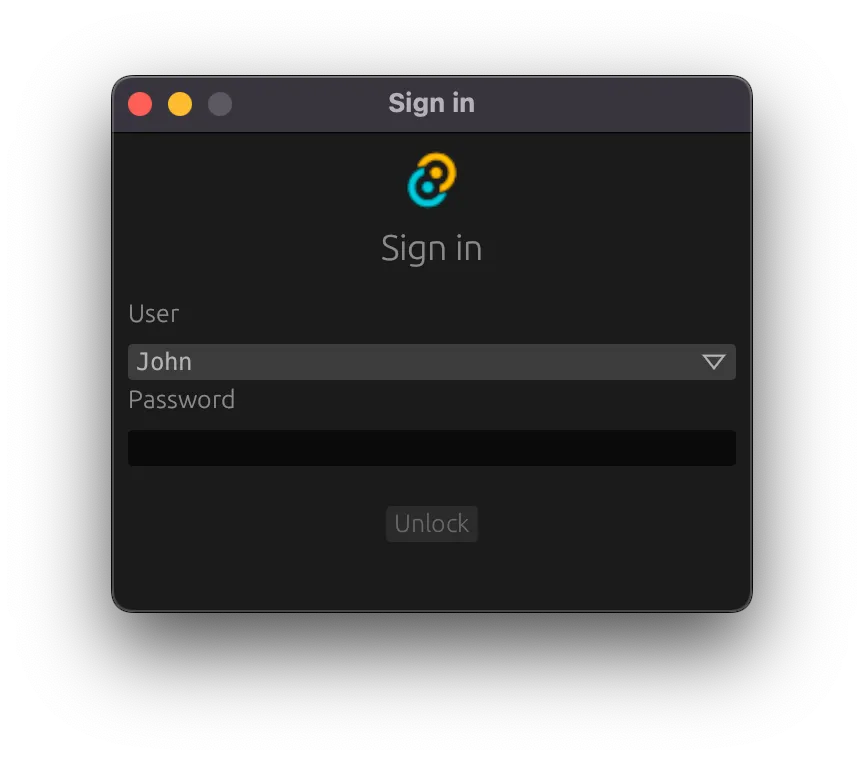
Para personalizar la apariencia de tu aplicación egui, consulta la API Context#set_style.
© 2026 Colaboradores de Tauri. CC-BY / MIT